Beacon
Book a live demo
IT Support Chat

IT support your users actually open.

Beacon lives in the Windows tray — zero sign-in for end users, one live queue for your techs, full multi-tenant control for MSPs. Self-hosted heritage, cloud delivered.

MFA mandatory · device auth default-on · your tenant, your data
OriginBuilt by working helpdesk technicians
AccessMFA mandatory for every tech
Zero-clickDevices authenticate — users never sign in
AuditEvery security event → your SIEM

Requests reach you as hallway grabs and email screenshots.

Texts to whoever answered last time. A voicemail nobody checks. Nothing is tracked, nobody knows who owns what, and the portal you bought sits unopened.

Beacon puts one icon by the clock on every machine.

Users click it. That’s the whole training manual.

The Product

One request, three surfaces — all real screens.

Everything below is the shipping product, captured from a live install. Click any screen to zoom.
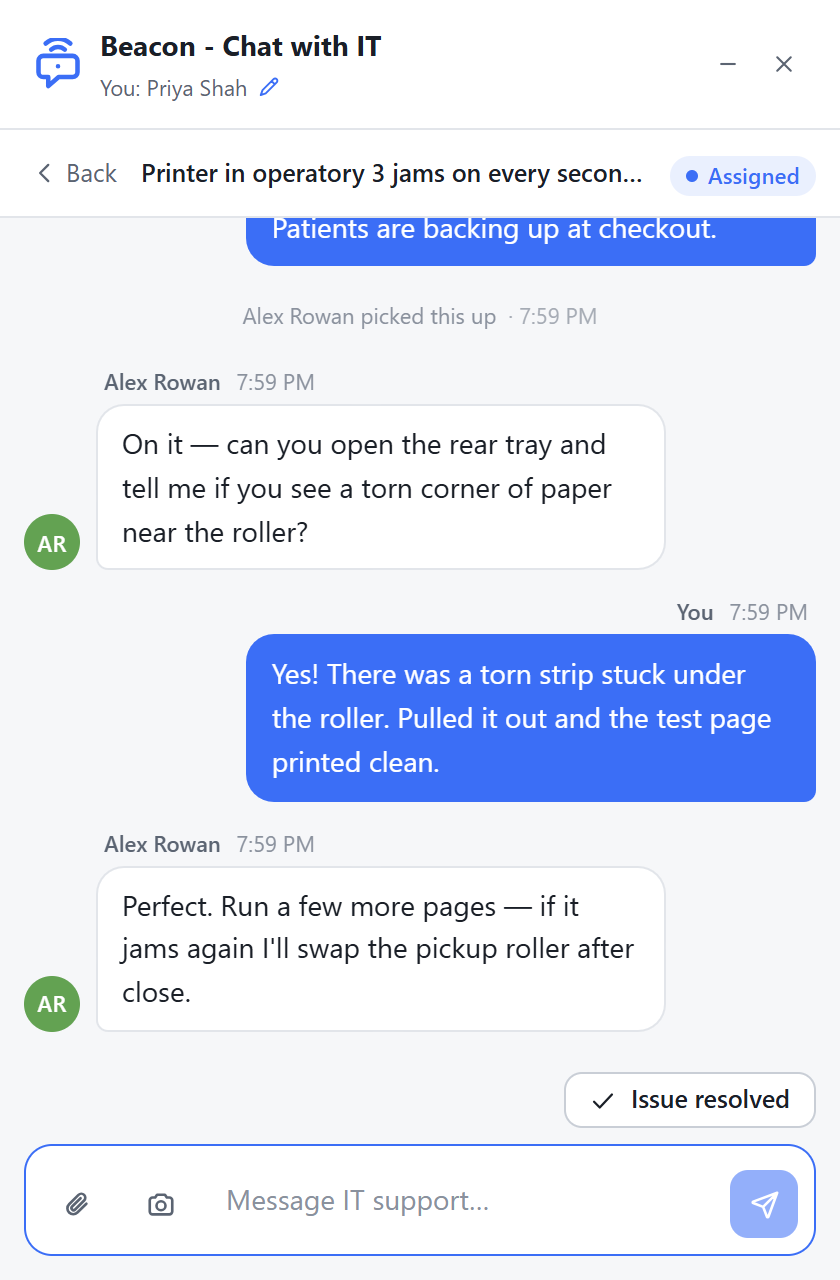
Beacon end-user widget: a chat with IT, identified automatically, with an Issue Resolved button
1 · The end-user side

No password. No portal. No training.

  • The device authenticates — users are identified from their Windows profile, zero clicks
  • “You’re #2 in line” — honest queue position, live
  • Screenshot snipping and file attachments built into the chat
  • Users mark their own issue resolved — with a reason, if you ask for one

“Users click the icon by the clock. That’s it.”
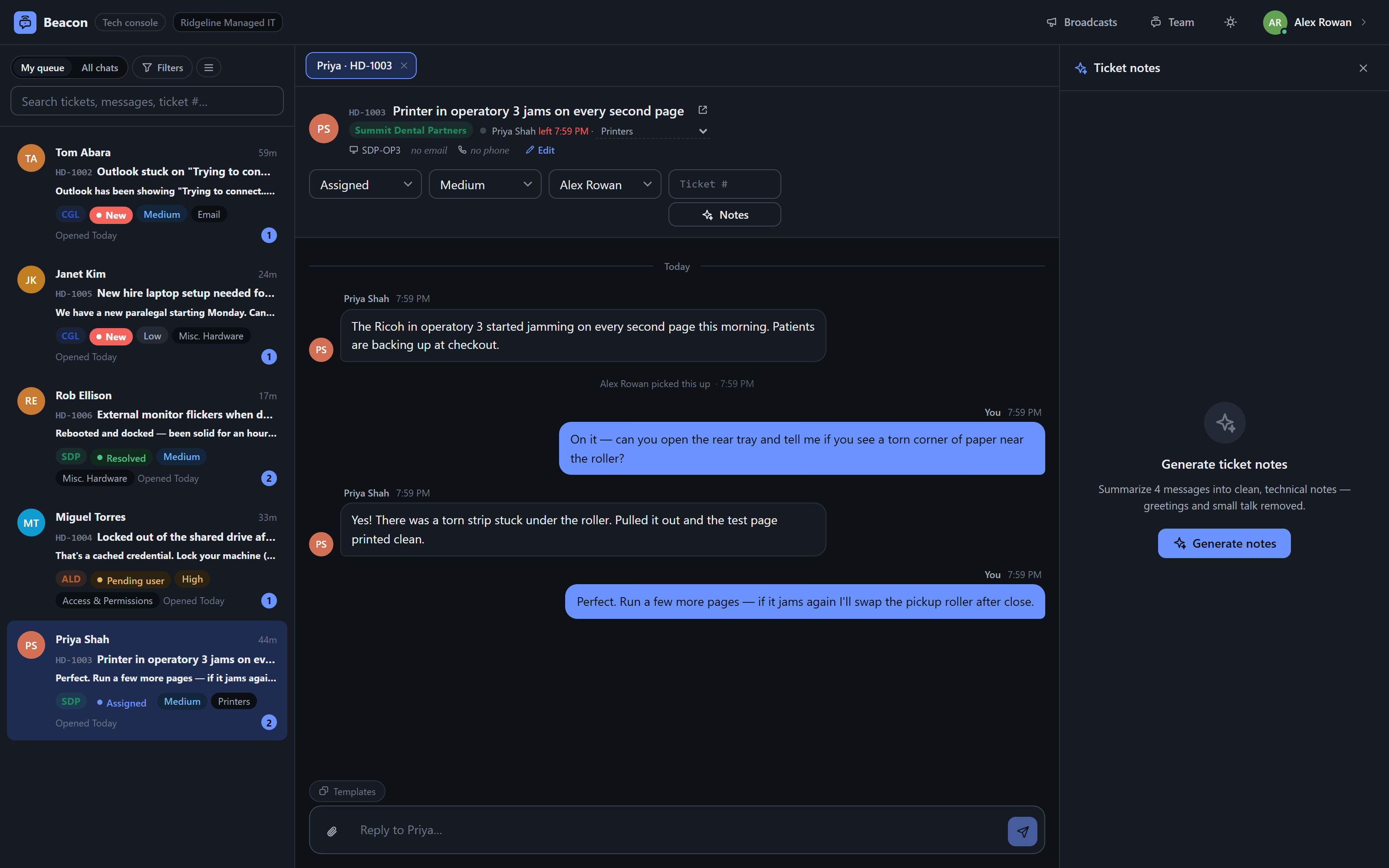
Beacon tech console: live queue with company badges and statuses, an open chat, and the AI ticket-notes panel
2 · The tech console

Built for the tech working six conversations.

  • One live queue, first-come-first-served, claim a chat just by typing
  • Multi-chat tabs and split view — four conversations on one screen
  • AI ticket notes: the whole chat distilled to clean technical steps
  • Team chat, away statuses, and automation chains that nudge silent tickets

“Not the vendor demo — the Tuesday afternoon rush.”

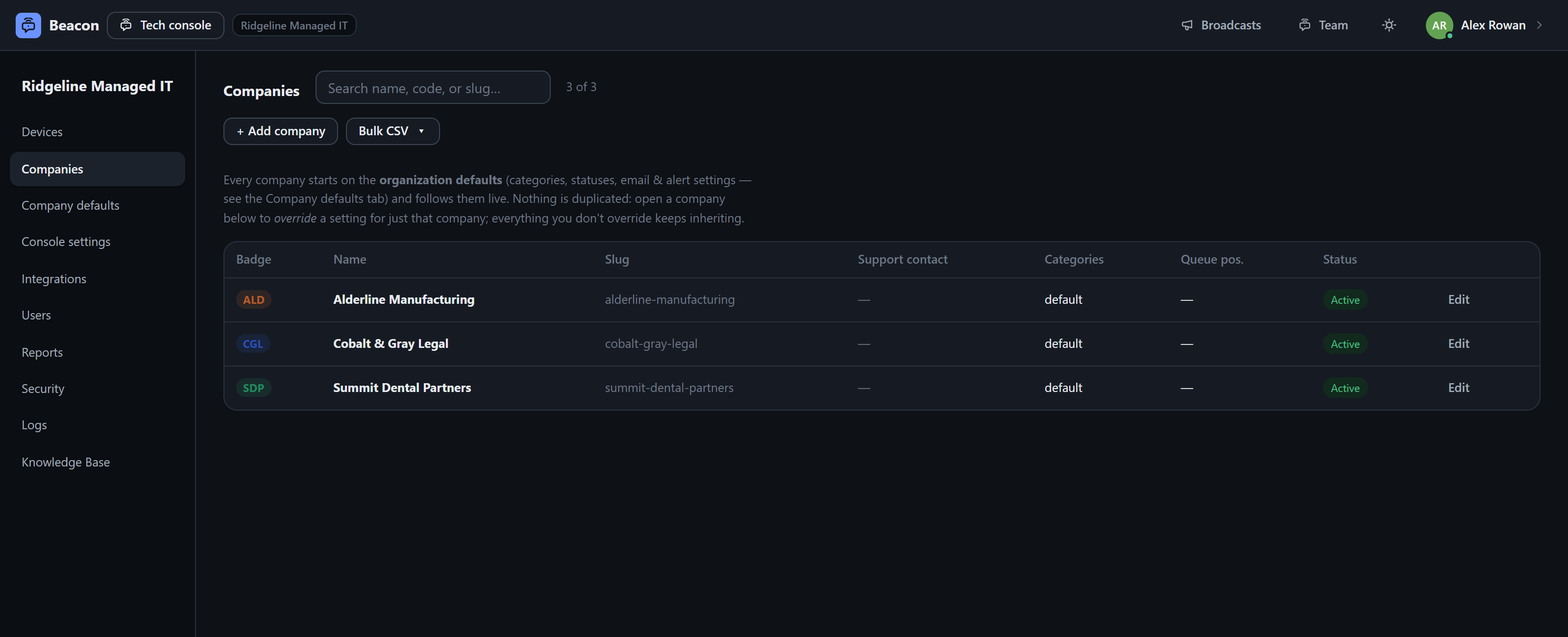
Beacon admin console: companies grid with badges, org defaults inherit live
3 · The admin console

Config once, inherit everywhere.

  • Org defaults flow live to every company — override only what differs
  • CSV import/export for onboarding whole client books at once
  • Duplicate a template client instead of re-configuring the next one
  • Scheduled reports, audit logs, and per-company everything

“Built for the org with three clients — and the one with three hundred.”

Built for how you run support

Three teams, one beacon.

AI Rollup

The chat writes the ticket.

One click turns a messy conversation into clean technical notes — fluff removed, steps labeled, environment captured. Copied to your clipboard, or posted straight into your PSA as resolve notes.

The conversation

The ticket notes

Show another chat

Powered by Claude when you bring an API key; a built-in summarizer covers you when you don’t.

Integrations

It fits the stack you already run.

Every integration is bring-your-own-tenant: your credentials, your instance, org-scoped, secrets write-only.

Beacon
NinjaOne RMMA “Remote” button in every chat — one click from the device dashboard.
Your PSAHaloPSA preset, a universal REST connector, or plain email intake — any PSA with an API or an inbox.
Microsoft 365Entra SSO per client tenant; tickets send as the user via Graph.
Your SIEMSecurity events stream out as webhook JSON or RFC 5424 syslog.
Intune · GPO · RMMSilent MSI/EXE deploy with the enrollment secret baked in.

Nothing is hardcoded to our stack — Beacon pushes to your tools, not the other way around.

Security posture

Trust dresses down.

No badge wall — just the controls, verifiable in the product.

Mandatory TOTP two-factor for every tech and admin — single-use recovery codes, enforced at every root request
Per-device tokens + per-org enrollment secrets; enforcement is on by default — end users never hold a password
Microsoft Entra SSO with per-user exemptions; MFA delegated to your Conditional Access when SSO is on
12-character strong-password policy at every entry point — including the “Generate” button
Full audit log; security events stream to your webhook or syslog collector, device lifecycle included
Secrets are write-only through the API; tenant data is isolated per organization
Rollout

Deployed like software, not adopted like a portal.

  1. Download your org’s installer.The enrollment secret is baked into the file — a fresh double-click self-enrolls.
  2. Push it silent.Intune, GPO, or your RMM — one command, per-company binding included.
  3. Watch devices appear.They self-enroll into your console and keep themselves updated on a staged feed, rollback included.
deploy — your RMM, Intune, or GPO
PS> msiexec /i Beacon-Setup.msi COMPANY=acme ENROLL=<secret> /qn ✓ installed silently · device enrolled · appears in your console
Questions

The ones that stall a demo, answered now.

Do end users need accounts or passwords?

No. The device authenticates with a per-device token and your org’s enrollment secret. Users are identified from their Windows profile and just start typing. Browser access supports sign-in for the folks who want it.

Does Beacon replace our PSA or ticketing system?

No — it feeds it. Chats become PSA tickets (manual or automatic), status can sync back, and resolve notes post themselves from the AI rollup. Beacon is the front door your users will actually use; your PSA stays the system of record.

What about Macs?

The tray app is Windows today; the browser widget works everywhere. A macOS shell is on the roadmap — the config plumbing for it already ships.

Where does our data live?

In your organization’s isolated tenant, with a full audit trail you can stream to your own SIEM. Beacon began life self-hosted inside a working helpdesk — that architecture didn’t change when it moved to the cloud.

How long does rollout take?

An afternoon with Intune or GPO. The installer carries everything it needs; devices enroll themselves and self-update from then on.

What does the AI see?

Only the single chat being rolled up, only when a tech clicks the button. Bring your own API key — or use the built-in summarizer and no chat ever leaves your server.

Light it up for your team.

A 30-minute demo on a live org — your scenarios, real screens, no slides.

Book a live demo or email hello@supportbeacon.io